헤이리 출사

헤이리 모델 촬영
헤이리 출사중

다른 팀원들의 바쁜 업무일정으로 이번달 찰나 출사는 다음으로 미뤄져 버렸지만 소니코리아와 디카몰에서 후원하는
소니-미놀타 카메라 사진 동호회의 사진 촬영회가 있어 신청해 운좋게 참가 인원에 포함되어 지난 주말 헤이리를 다녀왔습니다.
촬영일 전날 유난히 늦가을 비가 적지 않게 내려 당일 야외촬영이 가능할까 내심 걱정하였는데, 왠걸... 당일 오전부터 날이
개어 오후에는 정말 맑은 하늘을 볼 수 있었습니다.

덕분에 한동안 셔터를 못 눌렀던 울분(?)을 마음껏 풀어주고 왔습니다.

헤이리 출사중

헤이리 출사중

실내 촬영장 스케치입니다. 촬영 결과물로 프레임 안에서 웃고 있는 모델 사진만 볼 때와는 또 다른 분위기가 느껴지시나요?


헤이리 출사중

어느 갤러리를 지키고 있던 허숙희( ^^;;) 입니다.


헤이리 출사중
이름 모를 철새들도 새 보금자릴 찾아 오늘 하루도 열심히 날아 오르더군요.

아래로는 촬영 당일 모델로 수고해 주신 유영숙,김선미,전현주님 입니다.

헤이리 출사중
헤이리 출사중

헤이리 출사중

헤이리 출사중

헤이리 출사중

헤이리 출사중

이번 출사에서는 촬영한 컷에 비해 마음에 드는 컷은 적었습니다. 그도 그럴것이 촬영에 불 붙기보단 동호회원들과
맑음 공기속 색다른 장소에 있는 그 자체를 즐기느라 촬영은 조금 건성이었다고 할 수 있거든요..
하지만, 실컷 셔터 눌러 스트레스를 날릴 수 있어 그 자체로도 나름 의미는 있었습니다. ^^

2007/11/28 01:09 2007/11/28 01:09
Trackback Address:이 글에는 트랙백을 보낼 수 없습니다

윈도우 서비스모드로 설치한 톰캣 4의 설정 변경하기

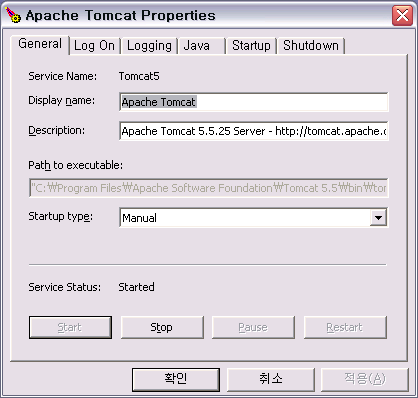
톰캣 5 버전부터는 작업표시줄에서 톰캣을 모니터링 할 수 있는 Apache Tomcat Proterties 라는 유틸리티가 있어
이를 통해 톰캣의 설정을 변경 할 수 있지만 톰캣 4 버전대를 서비스모드로 설치하면 프로퍼티를 수정 할 수 없어
난감할 때가 있습니다.
사용자 삽입 이미지
Tomcat 5 버전의 모니터링 툴

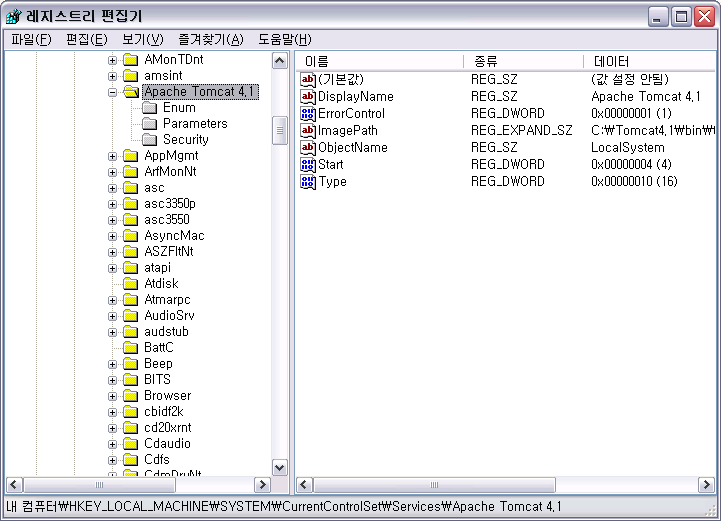
이럴 경우 레지스트리 에디터를 열어
HKEY_LOCAL_MACHINE\SYSTEM\CurrentControlSet\Services 아래에서 Apache Tomcat 항목을 찾으시면
프로퍼티를 수정 할 수 있습니다.

사용자 삽입 이미지
Tomcat 4 버전이라면 레지스트리에서 수정하자!!


2007/11/27 15:56 2007/11/27 15:56
Trackback Address:이 글에는 트랙백을 보낼 수 없습니다

톰캣 5.5 서버에 가상호스트 설정하기 :: Virtual Host Configuration on Tomcat 5.5

Tomcat 5.5 버전대의 웹어플리케이션을 설정하는 방법을 정리 해 둡니다.
물론, Jakarta-Apache 의 Tomcat 매뉴얼 을 참조하는게 제일 정확하고 올바른 방향입니다.

이 문서를 작성하는 이유는 처음 웹어플리케이션을 구축하는 단계에서 꼭 필요한 설정사항과 설정파일을
간편히 참조하고자 하는데 그 목적이 있습니다.

1. Context Path 설정
톰캣 4 버전대의 경우, Context Path를 [CATALINA_HOME]/conf/server.xml 에 기술 했지만 5 버전부터는
그 방법이 바뀌었습니다.

  - 1단계 :  [CATALINA_HOME]/conf/server.xml 에 HOST 항목 추가하기
     톰캣 5.5 를 설치하고 난 후 server.xml 를 열어보면 아래와 같이 기본적으로 localhost 란 이름으로 HOST
     항목이 정의되어 있을 겁니다.

    <Host
        appBase="webapps"
        autoDeploy="false"
        liveDeploy="false"
        name="localhost">
    </Host>
      이 아래에 이어서 추가하고자하는 HOST항목을 추가 해 줍니다.
    <Host
        appBase="webapps"
        autoDeploy="false"
        liveDeploy="false"
        name="www.new_site.com">
    </Host>

   - 2단계 :  [CATALINA_HOME]/conf/Catalina 디렉토리에 HOST 디렉토리 추가하기
      디폴트로 [CATALINA_HOME]/conf/Catalina/localhost 란 디렉토리가 있을겁니다.
      [CATALINA_HOME]/conf/Catalina 디렉토리 내에 1단계에서 추가한 HOST ( www.new_site.com )의
      이름을 갖는 디렉토리를 추가합니다.

      [CATALINA_HOME]/conf/Catalina/www.new_site.com

    - 3단계 :  ROOT.xml 생성
      2단계에서 생성한 디렉토리 내에 빈 ROOT.xml 을 만들고 그 파일에 context path를 기술해 줍니다. 
      <?xml version="1.0" encoding="UTF-8"?>
      <Context
          docBase="D:/Project2007/AirForceClubReservationSystem/build/web"
          privileged="true">
      </Context>

      여기서 docBase는 웹어플리케이션이 위치하는 절대경로를 기술해 줍니다.


2. 공용 라이브러리 설정

    - 4단계 : 공용 라이브러리 배치하기
      위와같은 순서로 톰캣서버에 여러개의 호스트가 존재 할 수 있는데 모든 호스트가 공통으로 사용하는 라이브러리 ( JDBC드라이버와 같은 )
      등이 있을 수 있습니다. 각각의 호스트별로 java 옵션을 통하여 클래스패스를 걸어주셔도 되지만 톰캣이 올라가는 와중에 
      참조해야 하는 라이브러리라면 굳이 옵션으로 주시지 않으셔도 됩니다.

      [CATALINA_HOME]/common/lib 디렉토리안에 필요한 라이브러리를 넣어두시면 톰캣 스타트업시 별도의 클래스패스를
      잡지 않아도 자동 참조를 시도 합니다.

    - 5단계 : Tomcat 재시작 하기
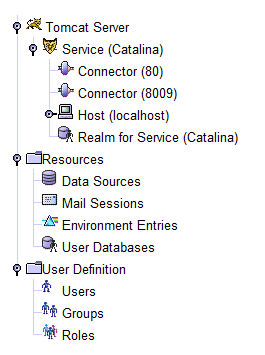
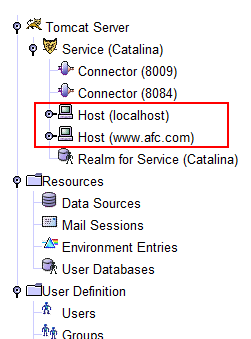
      여기까지 설정한 후 톰캣을 재시작 하시면 톰캣 어드민 콘솔을 통하여 다음과 같이 HOST가 추가되어 있는것을 확인 하실 수 있습니다.

호스트 추가 후호스트 추가 전

                                       호스트 추가 전                                                            호스트 추가 후


    - 6단계 : 접속 하기
      hosts ( C:\Windows\System32\drivers\etc\hosts ) 파일을 열어 위에서 추가한 호스트 ( www.new_site.com ) 를 
      로컬 호스트로 지정 한 후 
                127.0.0.1                www.new_site.com
      브라우저를 열고 http://www.new_site.com:[포트번호] 의 주소로 접속 해 본다.

2007/11/27 15:38 2007/11/27 15:38
Trackback Address:이 글에는 트랙백을 보낼 수 없습니다
  1. 2007/12/06 13:05
    Tomcat 5.5에서의 <Context> Tracked from A2공간 - 도움되는 글을 쓰자

자바 SE 플랫폼 개괄 :: Java SE Platform at a Glance

2007/11/23 18:29

서비 JAVA ,

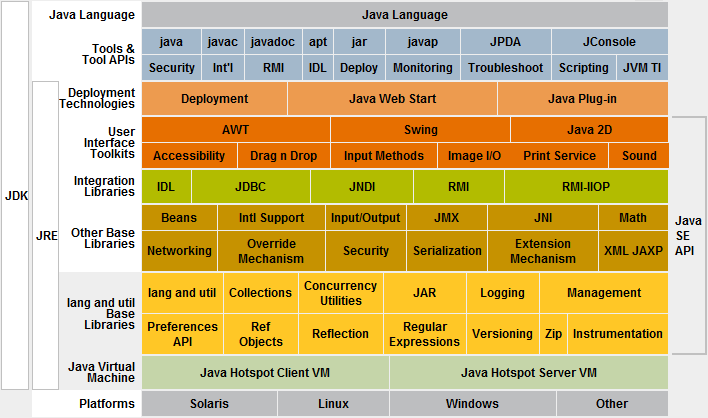
아래는 SUN사의 자바사이트에 포스팅 되어있는 자바 SE 플랫폼의 개략도 입니다.
사이트를 방문하시면 각 layer / topic 별로 링크가 되어 해당 기술에 대한 참조를 할 수 있습니다.
Java EE 와 ME 도 이런식의 도해가 있을 줄 알고 뒤져 보았는데 안보이더군요.

Java SE Platform at a Glance
2007/11/23 18:29 2007/11/23 18:29
Trackback Address:이 글에는 트랙백을 보낼 수 없습니다

최고의 루비온레일스 개발도구 넷빈즈 :: Netbeans THE best ruby on rails IDE

아직까지 Ruby를 사용해 프로젝트를 진행 해 본 적은 없지만, 살짝 관심을 가지고 있기때문에 몇몇 자료를 찾는동안 넷빈즈의 루비에디딩에관한 포스팅이 있어 찬찬히 보기위해 옮겨둠.

I use netbeans 6, milestone 10 (get it here) as my ruby on rails ide now. I’m a mac user, having moved from windows last year.

I was gonna write a blow for blow comparison of netbeans against radrails, but I really see no point. I figured it’s best just to tell you why netbeans’ rails support is so creamingly good, but so you know I have evaluated both and textmate, firstly – here’s some points about the other 2.

Text Mate

First up, as a general text editor I love textmate, it’s truly fab – and it’s NOT an IDE.. which is my number 1 reason for not using it for RoR: I was new to rails so needed an IDE that had some code completion, or just some documentation support, which textmate doesn’t support. Also I found that to get it working in a way I liked took ages – on top of that the following annoyances really pissed me off:

  • The indent key not being tab (it’s square bracket),
  • The project window (drawer) disappearing from time to time,
  • Dragging more folders into a project is like playing an 8-bit platform game: you have to be pixel perfect,
  • The find really means find (as in you can’t see where the search results are, you literally have to scan the page to find what textmate has found – and it never seems to wrap searches for me).

But as I said, textmate still rocks, but it wasn’t floating my ruby boat.

Eclipse

“It ain’t no use in calling out my name, Gal

Like you never done before

And it ain’t no use in calling out my name, Girl

I can’t hear you any more

I’m a thinking and a wond’ring all the way down the road

I once loved a woman, a child, I’m told

I gave her my heart, but she wanted my soul

But don’t think twice, it’s all right”

Bob Dylan – “Don’t think twice, it’s all right”

Okay perhaps a bit too dramatic, but really – when I first found eclipse, I was in love. I was using power flasher from FDT, which was THE best actionscript editor of all time imho. Eclipse was an utter revelation for me. I would sing it’s praises (I mean metaphorically, not like Bob Dylan) to my friends and colleagues, even my clients.

When Flex builder came out I was similarly marvelled by its’ ease of use for editing as3 and mxml (especially the layout gui) – but like the matrix, my eyes had never really learned to see. You see, I’d only recently moved from windows to mac – and was starting to shed the weight of windows with its’ dialogue boxes, bugs, qwerks, awkward behaviours, work-arounds and was starting to find out what computing was really meant to be like.

I’d been singing my “eclipse rocks” song on #flex and arguing it’s pro’s and cons with some visual studio lovers there. I found I didn’t have the will to defend it anymore: I was starting to fall out with eclipse very rapidly. Here are some reasons:

  • Subversion support is cacka.. Honestly, it sucks balls,
  • Find and replace dialogue is like punishment – it’s just dumb and clunky,
  • Context sensitive menu items are never what I want,
  • Setting up a project is like being told off by your nan. Honestly, it’s always “You can’t put a project here”, “There is an existing project somewhere near this folder, I can smell it”, “I am going to waste 20 minutes of your time MWAHAHAH”. Okay, I might be exaggerating the error messages – but anyone who knows the pain will understand what I mean.
  • In fact, that last point is the reason I put the Bob Dylan song reference – Eclipse feels like the girlfriend (or boyfriend) who just wants too much.

On top of that rails support in eclipse is only available via RadRails. RadRails seems to be the back burner project for Aptana these days – very little has been achieved with radrails this year (I’m saying this in comparison to netbeans). No offence to radrails: what they achieved at the time was truly incredible especially with just 2 coders doing it for love.

However, for me at least, radrails has the following problems:

  • Code completion is abysmal, and really, if I’m not going to get that feature, why use eclipse (100+mb of ram) instead of textmate?
  • In line documentation isn’t too good,
  • Not a very nice workflow for me – feels, dare I say it, too much like eclipse,
  • It’s in eclipse – which means all the pain in the arse problems of eclipse, with the limitations of radrails.

I’m sure radrails can be truly great with some time, but it seems like all that time is spent on implementing php support for aptana (which incidentally is very very good, and if it wasn’t in eclipse, and had better rails support, I would use).

Enough whining, I thought this article was about netbeans!

Okay, so that’s my little whinge done – I was sick of radrails, and I needed more than textmate could give me – I needed an ide that helped me to learn ruby on rails, not that helped me to learn the ide. I wasn’t a rails guru, all the textmate shortcuts in the world weren’t going to help me. I looked about and by chance came across an article that said that ruby on rails support was being added to netbeans 6. I hunted around like a crack addict and found the nightly builds to try out.

I was extremely impressed.

Netbeans is fucking fab, it proper rocks. I’ve been on netbeans 6 since milestone 8, which is about 1,000 builds now (they’re constantly working on it, and updating it). I’ve been with it through broken indentation, broken code completion, broken everything, null pointers, new features, more efficiency, the memory leak sorted out. I’ve watched it evolve before my eyes: I was installing new builds twice a day – Now it’s so stable and so good that I haven’t updated my build in a month (I might later on ;-).

I thought netbeans was only for Java, and the name sucks balls!

I agree on both of these points. I too thought it was only for Java, and I HATE the name. Truly – I once upon a time, had to work with beans in weblogic, and the name reminds me of that. I always thought it was a sucky name for Java objects, and I think it’s worse for an IDE.

However rest assured, I know, I know – you think it’s just for Java, even now months on I find myself wanting to banish it to hell, because it must be from the devil itself, because netbeans is just for Java… but after some time, I’m sure I’ll come to accept that the program I edit my rails in every day, really, truly, is netbeans.

Doesn’t it use like, 1 gajillion uberbytes of ram?

No, though it isn’t a text editor, and has a lot of functionality, so it does use a fair amount of ram. The whole IDE is easily comparable to eclipse for ram use, BUT: You an get a standalone version of the ide, which only has the ruby support. I believe you can get it here

I’ve got an imac with 3gb of ram, so I’ve got netbeans with the full monty, all my c++, java, and ruby plugins, so despite the fact it uses as much ram as a small os (about 250mb) I don’t even notice.

When I only had 2gb, I was perfectly comfortable with the standalone version, which would use between 80mb and 120mb).

So why is netbeans so good?


Code completion that works – really really works:

Code completion is activated with CTRL + SPACE – once activated you can type, or select from the list:

Image of code completion

The code completion knows a lot of the rails framework already:

Image of code completion

Like this…

Image of code completion

And this…

Image of code completion

Upon selecting the item you’re looking for it also puts place holders in for completion, so you can tab through to enter arguments:

Image of code completion

It works on your own classes too, check this out – NO OTHER RAILS IDE can do this, to my knowledge:

Image of code completion

I like the way it groups all the attributes up by the object too – also, it doesn’t just work for my models, it works also for my other classes, look at this IPAdress from my Infrid module, netbeans knows about that too:

Image of code completion


The best subversion integration I have ever seen in an IDE:

You can easily track the status of your files – from here I can clearly see that database.yml is updated while edit.rhtml is new:

Image of svn integration

The subversion context menu gives you everything you need.

Image of svn integration

Here’s what happened when I clicked “show changes” on my vcRails project

Image of svn integration

And from here you can select to commit, update, do diffs, etc

Image of svn integration

You can search the history for any files (might be hard to see, but you can search by message, user, date)

Image of svn integration

And here are what the diffs look like in the files themselves:

Image of svn integration


In line documentation when you need it, where you need it:

Just press CTRL+SPACE on a keyword and you get the docs.

Image of inline documents

Even picks out the documentation from your own methods

Image of code completion


Purdy colours:

I like the default colours of netbeans very much -here’s what one of my models looks like:

Image of syntax highlighting

And here’s an rhtml file:

Image of syntax highlighting

And here’s an rjs file:

Image of syntax highlighting

And here’s a yaml file:

Image of syntax highlighting


Code navigator

This useful little window tells you the anatomy of the file your viewing, double click to go straight to a method:

Image of code navigator


Useful highlighting:

I swear these guys have read design documents or suchlike, it’s so useable, look at this – I click on if:

Image of syntax highlighting

Click on end, or move the caret over it with the cursor keys:

Image of syntax highlighting

Click on rescue, or move the caret over it with the cursor keys:

Image of syntax highlighting

Same for a bracket:

Image of syntax highlighting

Also note the grey squiggly line under the variable – this is netbeans telling me that I never use that variable – oops! Glad I wrote this post!. :)

A variable, or keyword:

Image of syntax highlighting


code folding:

You use the + and – buttons to fold code

Image of code folding

And unfold it

Image of code folding


useful aids:

I wont show screen shots for these, just take my word for it

  • Typing a bracket, or a quote, or square bracket will give you a matching bracket.
  • Highlighting text, then pressing ( or ” or [ will wrap it in the appropriate symbol.
  • Unlike other text editors (both eclipse and textmate) deleting an auto inserted character isn’t a pain the bum. E.g. if I type ‘(’ and it automatically inserts ‘)’, upon changing my mind and deleting the ‘(’ it will also delete the ‘)’
  • Really smart tab indenting – trust me, it really smartly indents the tabs. IT does some great stuff with tab indentation – also you can indent blocks using tab or shift and tab.. you just select a bit of your code..

Image of indenting

Press tab (note that the first line wasn’t totally selected, so you can indent a line by only select a few chars – mint!

Image of indenting

And you can tab back with shift and tab. Also note that the entire thing gets flattened.. With each subsequent press of shift tab, it will flatten another level – this is one of my fave features as I can easily re-factor blocks of code and then get them indented super quick in a doddle. (I hate it when editors will stop me from flattening my code using the indent feature)

Image of indenting

A syntax error in my rhtml:

Image of syntax error


Log output, complete with hyperlinks for errors

I love the log output window – it shows you the results of rakes, svn submits, and best of all log output from your running mongrel (which you can run from in netbeans by clicking the play icon).

Here you can see the output of my running mongrel. It automatically turns stack traces into hyperlinks.. Click on them and you go straight to the line.

Image of syntax error


Jump straight to definitions

Holding down the apple key (CTRL on windows?) and mousing over a keyword, method, attribute or object will highlight any that netbeans can identify (which is most). If you then click on that definition, it will go straight to the code for it. I would show you a pick of this, but I’ve done so many!! I’m sure you get the idea.


Top class database integration, built straight in

It’s easy to get set up with a sql database and perform selects, updates, create tables, etc, all in netbeans

Image of sql editor


First class debugging

Of course you can debug nicely with drb, but netbeans really goes much much further. It’s actually close to what I was used to in visual studio. It really is fully integrated.

You can set breakpoints in your code from the ide:

Image of debugging

And then run your rails app by selecting debug from the menu, or clicking the relevant icon.

As you’d expect: code execution stops when you hit the breakpoint, but back in netbeans the party is just starting:

Image of debugging

View all environment variables – you can see their types, and contents, and expand hashes and arrays too !

Image of debugging

Set watches:

Image of debugging

View the entire calls stack – double clicking will take you to appropriate file at the right place.

Image of debugging

Step through the code:

Image of debugging

And here we can see I’ve advanced a couple of lines: (I pressed F8) – note the watch I had set up, I can see the user that got returned by the code, and his attributes:

Image of debugging

You can even mouse over objects and variables when in breakpoint mode and the ide will pop up the values (my mouse is over request.remote_ip):

Image of debugging

And look at the user.email variable (my mouse is over that too)

Image of debugging

I didn’t realise, but I can actually change the variable in realtime, and it shows me the current value (I changed email to id).

Image of debugging

I don’t think it gets much better than that!


Full support of rake and script tasks

You can run rake and script tasks such as server, console and generate straight from the project tree:

Image of tasks

Rake tasks:

Image of tasks

Generations:

Image of tasks


Manage your gems, right from the ide

Note, I’m not suggesting that all this GUI loveliness is easier, or better than using the command line – I’m a hopeless keyboard junky, and my mouse is just an interruption to the conversation I have with my keyboard- however, sometimes I’ve got loads going on, and I just can’t be arsed to open another terminal window for one command (sacrilege?) – in these cases, like generating a new migration, or checking what gems I have installed, it’s convenient

Image of tasks


Execute database migrations from the ide

This is really handy:

Image of tasks


Execute all of your tests inside netbeans!

I’m not even going to get started on this.. perhaps a future blog post!


(imho) Best search, find, replace of any ide, I’ve ever used

I cannot begin to tell you how much I love search and replace in netbeans:

  • Supports regular expressions,
  • Searches whole file, and forward and back, and with wrap,
  • Can search a whole project, or across multiple projects,
  • Results are clear and easy to read,
  • It highlights ALL matches so you can find them easily,
  • Highlights as you type:

Here I am looking for the letters “us”. I’ve not pressed return yet, it highlights as I type :-)

Image of search

Now “user_”

Image of search

Now “user_id”

Image of search

And as I said, you can search across a project, when you do you get this results window, which unlike eclipse, puts the FORWARD and BACK arrows, next to the results, not on some totally random part of the page, meaning a lot of useless mouse travel. It’s like netbeans got someone to do a report on all the cack features of eclipse, and started from there…

The search dialogue:

Image of search

And the results:

Image of search

I’ve put so many pics in here, just take my word for it that it highlights the search matches in the document.


Macros

These are a great feature – you can record all sorts of behaviours, including search and replace with regexs, and bundle them up in a macro which can be repeated over and over again.

I found this really useful when dealing with a load of csv text that needed putting into sql and would’ve been quite a pain to do in ruby, but with the macros was really easy. I’m sure this would have lots of other uses too.


Code templates

These are great! It’s like in textmate where you type a couple of characters and press tab.. E.g. If I’m in an rhtml file and type r and press TAB I get:

<% %> with my cursor flashing away in the middle of it, so I can start typing straight away:

re and TAB:

<%= %> Again with my cursor in the right place table and TAB

They’re great, and you can configure your own so easily, and if you follow conventions, the default values are very useful – you can of course change them, just by tabbing to each one. A very powerful, and useful feature that saves a lot of time.

Image of templates


Easy to configure

I wont go showing you pics here, because it will take me aeons but you can configure:

  • keyboard shortcuts,
  • tips,
  • which ruby installation to use,
  • colours,
  • indentation,
  • code templates,
  • which tool tips to use,
  • just about anything you want – really easily and logically.


Jump straight to any file:

I forgot this, it’s my favourite feature probably: On a mac, I press CTRL + SHIFT + O and I get this box:

Image of goto file

I start typing the name of a file:

Image of goto file

Here’s another example:

Image of goto file

Once you find your match, just press return and it opens the file.


Friendly tab switching:

On a mac, I press CTRL + TAB, and I get this dialogue, I can tab back and forth between 2 tabs (as in open documents), or I can keep my finger on CTRL and keep pressing CTRL, or SHIFT and tab to cycle to the document I need.

Image of tab switching


Friendly shortcut keys to get to access different parts of the ide

  • Pressing APPLE 0 focuses on the code window,
  • Pressing APPLE 1 shows/hides the project window,
  • Pressing APPLE 2 shows/hides the files window,
  • Pressing APPLE 4 shows/hides the output window,

This is really useful and makes a lot of workflow’s possible.

I like to have my public folder, config and my db migrations open in the files view, and the ruby-centric files, like rjs, rhtml and rb stuff in my project folder, I can then apple 1 and 2 between them.

I also use apple 4 like it’s going out of style.. I can clear the window easily with APPLE and L then click around on my app in a web browser, come back to netbeans, press APPLE 4, and view the log – clicking on any errors takes me straight to the code.


It’s stable:

I’ve been through many versions of netbeans now -it’s still in beta, and some of them have had me banging my head. However, it’s solid now. You get the odd null pointer exception, but it wont fall over, and you wont lose work. I probably get some kind of anomaly like that once every few days – it’s not crashed on me in over a month of every day use.


Conclusion

I know I sounded like a whiney bitch earlier, but the truth is I don’t know of any other ide that has the feature set of netbeans when it comes to ruby on rails support. And even when one of its’ competitors has similar features, you can just guarantee that netbeans absolutely wipes the floor with it, in terms of implementation and ease of use.

There is no better rails ide, imho

I can’t say about text editors though, but really, if you’re just after an editor, well why the hell did you read this article? ;-) Get yourself textmate or a windows/linux equivalent (in fact, ditch windows and get textmate on mac, or a linux equivalent).

I could write this much about netbeans’ great features over again, btw – this isn’t an exhaustive appraisal – it’s just it’s bank holiday, and I got some other geeky fun I need to go have.

This is probably far too long an article, maybe I’ll split it up – I don’t expect anyone to use it as a reference, I just wanted to shout out about netbeans and all the hard work they’ve been putting in over there, especially Tor Norbye who’s been doing such an excellent job – he’s actually made an engine which may see netbeans supporting even more duck-typed languages in the future.

If you read this far, then thanks for reading. However, please, if you wanna be rude or a fanboy, go do it on digg – if on the other hand, you’ve got any constructive criticism, or any views on the whole netbeans and radrails debate, leave a comment.

However, I think you should just download it for yourself – if you want a ruby ide, I don’t think you can do better – and the I’m just gutted that I can’t edit actionscript in netbeans, because if I could I would.

Though – BE WARNED! After using netbeans 6, you will most likely not want to go back to eclipse and especially radrails.

http://test.lifeonrails.org/2007/8/30/netbeans-the-best-ruby-on-rails-ide

2007/11/23 13:27 2007/11/23 13:27
Trackback Address:이 글에는 트랙백을 보낼 수 없습니다

Javascript Framework Prototype

참고해야할 사이트들...

Developer Notes for prototype.js -  Prototype의 개발자 노트

Site design using Prototype - AJAX 이용 가이드~ JSON-PHP라는 것과 이클립스용 AJAX extension을 주목

AJAX Design Patterns - AJAX 디자인 패턴

Learning the JavaScript debugger Venkman
- 자바스크립트 디버거 환경 갖추기


라이브러리

Rico - LiveGrid같은 기능을 하는 Ajax를 찾고 있었는데!

script.aculo.us - Sortable List가 일품!

Moo.fx - 가벼우면서도 센스있는 디자인을 위한 라이브러리. Prototype에는 링크가 안되어있는데 꼭 놓치지 말고 보아야할 곳!

ZK - 디자인이 좀 투박하긴 하지만, 에러 메세지 보여주는 거랑 아쿠아 런처 스타일의 링크가 일품

dhtmlgoodies - 쓸만한 예제가 많다. 특히 Tab view는 감동 감동. Folder tree가 쓸만할 듯 그리고 Color Schemer와 Reg. tool, CSS lookup 등 쓸만한 툴도 일품!

LightBox - 이미지를 이쁘게 보여줄 수 있다.

2007/11/22 03:03 2007/11/22 03:03
Trackback Address:이 글에는 트랙백을 보낼 수 없습니다

올해가 가기 전 보고 싶은 영상물

올해는 예년과는 달리 제작 발표회라든지, 개봉 예정작 소식을 통해 '이건 꼭 보고 싶다.' 라고 저를 기대하게
했던 작품들이 유난히 많았던 한 해였던 것 같습니다.
기대 이상의 작품들도 있었고 평이한 수준도 있었습니다. 개중에는 기대치도 않았던 작품들이 저를 설레게
하기도  했었고요. ^^

시간이 흘러 올해도 2007년도 한 달여 남짓 남았는데요.. 올 해 보고 싶었지만 아직 보지 못한 영화가 두 편 정도 있어요.
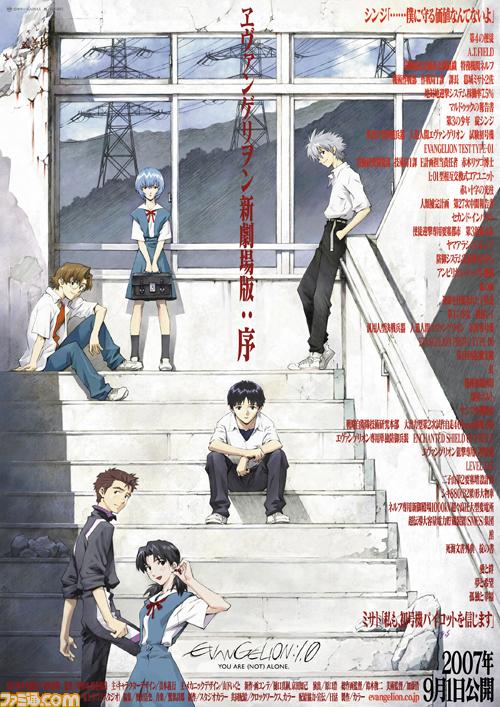
'에반게리온 신 극장판' 과 '철콘 근크리트' ('철근콘크리트'가 아닌 두 글자를 엇갈려 적은 '철콘근크리트'가 맞습니다.)

에반게리온 신 극장판 서철콘근크리트 鐵コン筋クリ-ト

에반게리온의 경우엔 제작 발표 당시에 비해 흥분도가 덜하긴 하지만( 극장편만의 오리지널 스토리가 아니라고 하더군요..
총 4화 중 마지막 1화가 다른 스토리 전개를 보일거라고.. ) 한번 봤던 영화라도 여러번 다시 보는 제 성격에 비추어보면 여전히
기대해도 좋을 작품이라 생각해요. 철콘근크리트는 제작 발표 소식과 트레일러무비를 통해 기대하기 시작한 작품이고 아직
자세한 정보를 모아 보진 않았어요. 트레일러무비를 보면서 '아치와씨팍'풍의 작화라고 느꼈는데 실제로 보면 많이 다르겠지요..  

이 두 작품을 아직 보질 못한게 아쉽긴 하지만, 아직 한 달이란 시간이 있으니 올해를 넘기기 전에 볼 수 있겠죠?

2007/11/19 16:35 2007/11/19 16:35
Trackback Address:이 글에는 트랙백을 보낼 수 없습니다

콘 사토시 :: 今敏

처음 '콘 사토시(今敏)'라는 연출가를 각인시킨 작품은 '퍼펙트 블루' 였다.
애니메이션으로 끌어낼 수 있는 모든 것을 보여 준 스릴러물. 

'퍼펙트 블루'의 스토리와 작화에 빠져 몇 번을 다시 볼 정도였으니, 작품을 만들어 내 놓은
연출가에 관심이 가는 건 당연지사.

영화 연출을 공부하다 애니메이션의 길로 들어섰다는 그는 현재 일본 애니메이션 계를
이끌어 가는 중심에 있는 인물들 중 한 사람임에 틀림 없다..

'퍼펙트 블루' 이후 콘 사토시 감독의 팬 아닌 팬이 되어버린 덕분에 그가 연출한 작품은
이제껏 한편도 빼놓지 않고 보게 되었다.

하나씩 늘어놓자면
  '퍼펙트 블루'
  '천년여우'
  '동경대부'
  '망상대리인'
그리고 올해 국내에서도 개봉한 
  '파프리카' (파프리카의 연출이 콘 사토시라니 >.<b )까지.

물론, 퍼펙트 블루 이전에 '노인Z' 라던지 '메모리스 그녀의 추억'등의 작품에서 설정, 각본 등의
스텦으로 참여한 작품들도 꽤 된다.


About 콘 사토시..


지극히 사실적인 극화에 판타지가 더해지는 그만의 독특한 스타일이 관객과 비평가 모두의 찬사를 이끌어내는
힘이 아닐까 한다.
지금까지도 그랬고 앞으로도 계속 '진화' 해 나갈 그의 작품들이 기대된다. 

참고 :  한국영상자료원에서 2007년 12월 8일 오후 2시 퍼펙트 블루를 상영 해 준다고 하니 관심 있으신 분들은
          한번 관람하셔도 좋을 듯하군요.
          링크 : http://www.koreafilm.or.kr/screening/program_movie_view.asp?s_year=2007&g_seq=41&p_seq=270&m_seq=1710

2007/11/15 15:36 2007/11/15 15:36
Trackback Address:이 글에는 트랙백을 보낼 수 없습니다
  1. 2010/08/25 11:27
    콘 사토시 감독 요절 Tracked from 서비의 다락방

심홍 ( 深紅 )

영화 심홍 포스터


"가족을 잃은 소녀가 범인의 딸을 만났다!"

초등학교 수학여행 중 갑자기 가족들이 사고를 당했다는 소식을 전해 들은 아키하 카나코(秋葉奏子, 호리기타 마키)는 가족들이 있다는
병원으로 향한다. 깊은 밤 고속도로를 질주하는 택시 안에서 피로와 불안 속에 4시간을 보낸 카나코. 그러나 도착한 그녀가 사람들에 의해
이끌려 간 곳은 시체안치실이었고 부모와 두 명의 어린 동생들은 이미 싸늘한 시체가 되어 있었다. 숙모인 사이토 카요(齊藤佳代, 다나카 요시코)
로부터 가족들이 살해당했으며 카나코만 운좋게 살아남았다는 것, 그리고 범인이 츠즈키 노리오(都築則夫, 오가타 나오토)
라는 이야기를 듣는다. 이후 카나코는 이 사건이 트라우마가 되어 가족의 사체를 볼 때까지의 4시간을 리얼타임으로 추체험하는
'공백의 4시간'이라는 발작을 얻게 된다.

8년의 세월이 흘러 대학생이 된 카나코(奏子, 우치야마 리나)는 가족을 죽인 츠즈키가 사형 선고를 받았다는 것을 알게 된다.
그 사건을 뒤쫓는 르포 작가 시이나 코이치(椎名皓一, 히라타 미츠루)를 만나 츠즈키의 딸 미호(未步, 미즈카와 아사미)가 사는 곳을
알아낸 카나코는 살인범의 딸이 어떻게 생활하고 어떤 인생을 걷고 있는지, 또 "나도 죽이면 어떨까?"라는 말을 시이나에게 남기고
그녀를 만나러 간다. 마침내 미호가 일하는 바를 찾은 카나코는 자신의 신분을 감추고 그녀에게 접근한다.

"나, 사실 사형수의 딸이야." 순순히 마음을 내보이는 미호. 아버지가 저지른 죄를 자신의 죄처럼 여기며 생활하는 그녀와 조금씩 친해지는 카나코.
그러니 미호가 아키라(明良, 우치다 아사히)라는 남자와 결혼하고 행복한 생활을 보내자 카나코의 분노는 극에 달한다. "내가 죽이면 어떨까?
아니면 내가 죽어줄까?" 카나코 속에 숨어 있던 광기가 움트기 시작한다.

하지만 미호는 가정 안에서 아키라의 무차별적인 폭력에 시달리고 있었다. 그 사실을 알게 된 카나코는 "죽여버리면 되지 않냐?"고
미호를 설득한다. 미호는 주저하지만 어느 날, 아키라에게 배를 걷어차여 아이를 사산한 후로는 그에 대한 살의를 분명하게 느낀다.
그리고 카나코에게 완전범죄를 위한 알리바이 조작을 도와달라고 요청한다. 치밀한 계획 끝에 다가온 범행일. 살인 실행을 앞두고 갑자기
'공백의 4시간' 발작을 일으키는 카나코. 그런 카나코를 놓아두고 혼자 아키라를 죽이러 가는 미호. 이 살인계획의 행방은?
그리고 8년 전에 일어났던 살인사건의 진실은?

작품 소개 보기..


한줄 감상평 : 일본 스릴러 영화는 왜 다들 하나같이 연출이 부족한 걸까? 일본 영화를 좋아하고 않고를 떠나 연출력이 부족한건
이 영화도 마찬가지. 일본 스릴러 영화의 고질적인 취약점을 감안하고 평가한다면 원작 소설은 얼마나 재미있을지 상상도 안간다.
애니메이션쪽에 있는 무수한 빛나는 연출가들이 영화를 찍으면 어떻게 될까?
2007/11/15 01:41 2007/11/15 01:41
Trackback Address:이 글에는 트랙백을 보낼 수 없습니다

이게 뭡니까...

2007/11/14 14:19

서비 낙서장

사용자 삽입 이미지
점심 직후에 NATE에서 광고 문자가 하나 도착했습니다. 그런데 그 내용이 참 거시기 하더군요..
'60분 통화권 줄게.. FTA를 지지해라.. ' 라는 내용이더군요.. 

저 처럼 FTA에 큰 관심을 두지 않고 있던 사람들을 솔깃하게 해 어떻게 해 보자는 심산이겠지요.

FTA가 '빵 줄게 헌혈해라..' 와 같은 수준의 고민거리였던가요?

처음부터 FTA를 지지하신 분들에게는 좋은 기회일진 몰라도 저처럼 나 몰라라 했던 사람이나 반대의 관점에
있던 분들이 이 메세지를 보면 어떤 생각이 들까요?

SKT에서 저런 서명을 받아 어디다 쓸지는 잘 모르겠지만 이렇게 해서까지 지지율을 높여야 하나..
씁쓸해지는군요.

---------------------
"'빵 줄게 헌혈해라..'와 같은 수준" 란 표현은 적십자나 헌혈 행위를 비하하려는 의도에서 든 비유가 아닙니다.
2007/11/14 14:19 2007/11/14 14:19
Trackback Address:이 글에는 트랙백을 보낼 수 없습니다
  1. 2007/11/16 21:56
    삼성 공화국 끝장나다! Tracked from 세상을 바꾸자~!
  1. 도대체 어디에서 주관하는 걸까요.
    황당하네요.
    개인적으로 적십자사에도 환멸을 느끼기 때문에 그다지..

  2. 그러게나 말입니다.
    SKT라는 업체가 득없이 이런 행사를 진행 할리 만무할텐데 말예요.
    결국 저 비용도 누군가의 돈으로 메우겠지요..

  3. 저게 사실이라면... 정부의 소행일텐디..

    이건 정말 허걱할만한 일인데욥

  4. KTF(SHOW)사용자인 저도 14일경에 위와 동일한 문자메시지를 받았습니다. 통화료무료라는 말과 함께(-_ -..)

  5. 다른 통신사도 동일한 문자가 갔었군요..
    하기야 거의 대부분의 국민이 휴대전화를 소지하고 있는 마당이니..
    통신사를 잘 요리하면 손쉽게 서명을 받아낼 수 있겠군요..

  6. Blog Icon
    기인숙

    왜 양자택일만 강요하는지 모르겠다...선별적으로 다룰 문제를...알고보면 자신들 이익을 위해 강요하고 있는 것이 아닌가 싶을 정도로...국산으로 하고 문제가 있다면 선별적으로 허용할 문제를, 국가가 일괄 계약하는 것도 우습다...분명한 것은 양자택일의 문제는 아니라는 것이다...

  7. 이건 정말 아니군요,
    60분 무료통화권을 마케팅 용도로 쓸때 보통 1인당 1000원정도의 비용을 통신사에 주게 됩니다. 통신사가 공짜로 줄리는 없으니, 이걸 지금 국민세금 퍼서 삽질을 하고 있군요.

  8. 그렇죠.. 누군가의 주머니에서 저 비용을 빼 가겠죠..
    그보다 문제는 저런 '치졸한 방법'으로 지지율을 얻어내야 하느냐는 거죠.

  9. Blog Icon
    비밀방문자

    관리자만 볼 수 있는 댓글입니다.

  10. 예 알겠습니다.

  11. Blog Icon
    퇴출 삼성

    삼성집사 놈현
    정말 너무한다
    졸개노릇도 유분수지
    서민과 중소기업의 무덤이될
    FTA를 이렇게까지 강요하다니
    정말 미쳐도 너무 미쳤다

  12. 저... 퇴출 삼성님.
    문자 보낸 곳은 삼성이 아니라 SKT인데요...

  13. Blog Icon
    정신차리세요.

    전 무료통화 60분 꼭 받고싶어서 SKT에
    저런 행사 한적 있냐고 물어봤더니
    공지된건 아무것도 없다고 하네요. 실제 SKT에서 보낸건지 스팸문자인지 피싱인지
    확인도 안해보고 이렇게 대놓고
    SKT까는글 올리는 작성자님은 바보인가요?
    이 포스트 삭제 부탁드립니다.

  14. 그럴수도 있겠군요..
    하지만 제가 아는 한도내에서는 'nate복주머니'는 SKT에서
    광고 문자를 날릴 때 이외에 사용 되는걸 보지 못했거든요.
    그래서 SKT에서 보낸 문자가 아닐까라고 생각한 겁니다.

  15. Blog Icon
    아놔 -_-

    저거 어떻게 받는거지좀 알려주세요
    60분 무료통화 제발 좀 받구싶네
    진짜.....
    아니면 헛소문 퍼트리지 말고
    저거 저한테 재전송좀 해주세요.

  16. 문자 아래쪽에 문의 번호가 있군요..
    전 관심이 없는터라 전화걸 마음이 없습니다.
    아놔 -_-님께 한번 확인을 부탁드려도 되겠습니까?

  17. Blog Icon
    아놔 -_-

    복주머니측하고 연락해서알아볼테니 잠시만요.

  18. Blog Icon
    1111111111

    돈에 눈먼 SK 부터 각성해야
    ㅡ,.ㅡ;

  19. Blog Icon
    동의는 무슨

    지금 상태를 보면 절대 동의하면 안되요

    쇠고기 수입하는거도 걸리면서 계속 똑같은 거 봐요

    일부러 그런다니까요

    FTA되면 좋은 거 같아도

    현대나 이런데나 좋겠지

    실질적으로 좋은게 없음

  20. Blog Icon
    스팸문자에 낚이지맙시다.

    SKT측에서는 이런 문자가 발송된 사실이 없다고하네요. 작성자님은 저 링크를 타고 가서 실제로 60분 무료통화가 제공되는지 확인해주시고
    피싱이나 SKT측에서 보낸것이 아니라면
    이 포스트 당장 삭제해주시기 바랍니다.
    다음블로거뉴스 탑에 노출되있는만큼
    SKT에 빠른 조치 취하라고 담당팀에 연락해놓은 상태입니다.

  21. 저도 SKT에서 이런 광고문자를 날리지 않았기를 바라는 사람중의 하나입니다.
    SKT에서 보낸 문자가 아니라면 당연히 본문 내용을 정정해야겠지요..

  22. Blog Icon
    fgfg

    고삐리 중삐리 들만 잔뜩 찬성하겠네 ㅋㅋㅋ
    나라가 어찌될 모양인지 ....미쳐돌아가고 있는세상...
    뭔가 숨기는것같은데 나같은 민초한테는 알려줄수없는건가?

  23. Blog Icon
    그럼 누가 보냈을까요/

    skt에서 보내지 않았다면 과연 누가 보냈을까요?

    궁금하네요.

    혹 skt에서 보내놓고 문제가 될 것 같으니 오리발을 내미는 것은 아닌지 하는 생각도 듭니다. 어디까지나 추측입니다.

    혹 정부가 skt의 명의(?)를 도용해 이런 일을 저지른 것은 아닐까요?

    치졸한 방법이네요.

  24. Blog Icon
    박가

    FTA원래 좋은것인데 저건 방법이좀..
    저런 업체가 FTA를 더 안좋게 만드네..
    반FTA에서 보낸거아녀???

  25. Blog Icon
    FTA는 원래 좋은 것?

    동의하기 어려운 면이 있네요.
    FTA는 원래 좋은 것일까요?

    경제학원론에 나와있는 내용만을 보면 그렇게 생각할 수도 있겠죠.
    하지만 현실에서 이루어지는 FTA협상은 경제학원론에 나와 있는 내용과는 거리가 너무나도 멀어보입니다.

    사람의 생각이 같을 수는 없는 것이겠죠.

  26. Blog Icon
    FTA가 원래 좋다니?ㅋ

    절로 로그인하게 만드시네요.
    무엇땜에 좋다고 생각하시는지.
    추진하는 정부 자체도 노동자나 농민에게 피해가 간다고 말을했는데.. 박가님은 그럼 기업운영하시는 분이신 모양이네요.
    FTA를 반대하는 사람들은 이런 치졸한 방법으로 하지는 않는 것 같습니다. 차라리 광화문에서 시위를 하지.ㅋ

  27. Blog Icon
    FTA가 원래 좋다니?ㅋ

    절로 로그인하게 만드시네요.
    무엇땜에 좋다고 생각하시는지.
    추진하는 정부 자체도 노동자나 농민에게 피해가 간다고 말을했는데.. 박가님은 그럼 기업운영하시는 분이신 모양이네요.
    FTA를 반대하는 사람들은 이런 치졸한 방법으로 하지는 않는 것 같습니다. 차라리 광화문에서 시위를 하지.ㅋ

  28. Blog Icon
    FTA가 원래 좋다니?ㅋ

    절로 로그인하게 만드시네요.
    무엇땜에 좋다고 생각하시는지.
    추진하는 정부 자체도 노동자나 농민에게 피해가 간다고 말을했는데.. 박가님은 그럼 기업운영하시는 분이신 모양이네요.
    FTA를 반대하는 사람들은 이런 치졸한 방법으로 하지는 않는 것 같습니다. 차라리 광화문에서 시위를 하지.ㅋ

  29. Blog Icon
    사실 이런게

    블로거뉴스 메인에 떳다는거 자체가..
    다음블로그에 관리시스템 자체가 전혀 없으며
    하물며 음란물이 올라오더라도 조회수만 많다면
    바로 메인으로 등록시켜줄
    썩어빠진 광고비에 눈이 먼 다음이 아닐수 없다.

  30. 저 역시 이런 부실한 포스팅이 다음 블로거뉴스 메인에 걸린게 좀 놀랍긴 합니다.
    하지만 메인에 걸린 시점에 조회수가 얼마 되지 않았다는건 확실히 말씀드릴 수 있습니다.

  31. Blog Icon
    누군지

    낚시에 걸렸네. 걸어보슈. 광고입니다. 그것도 동의없이 돈 빠져 나가는...

  32. 어이없는 메시지네요.

  33. Blog Icon
    1111111

    ,,제목보고,,,,ㅁㅊㅅㄲ들,,욕밖에 안나오네요,,
    우리나라 하는짓 꼴이참,,,,,,,,,,,,,,,,

  34. Blog Icon
    ㄷㄷㄷㄷ

    이 놈들이 아주 지X를 하네요

  35. Blog Icon
    황당

    저도 이 문자 보고 너무 황당하고 어이없어서 SKT쪽에 항의 할려고 지우지도 않고 가지고 있어요. 아주 통신사들 자기네들은 중간 마진만 채우면 된다고 돈독에 눈이 멀어 있군요. 문자 보자 마자 화가나서.....
    그리고 몇몇 분 확인도 안하고 통신사 까는 문자 올렸니 마니 하는 분..좀 의심스럽군요. 여긴 개인 블러그이고 없는 사실 올린것도 아닌데 뭘 까고 안까고 한답니까. 엄연히 저 문자 받은 사람이 한둘이 아니거늘.

  36. Blog Icon
    502

    정부가 여태까지 계속해 온 FTA 찬성 공중매체광고로는 성에 안찼나 싶네요.. 그 돈에 비하면 새발에 피겠죠..
    머 이런 광고비..
    한미FTA덕분에 피해입을, 대표적으로 농민들.. 그리고 이 땅의 민중들의 앞으로 더 잃을것에 비하면 새발의 발톱에 낀 때의 바이러스의 분자의 원자정도랄까나.. ㅍ~ ㅋㅋ

  37. 제 눈에는 그저 흔한 낚시 광고로밖에 안보이는데... 메시지의 멘트와는 상관없이 뭔가 통화료를 받아내는 낚시 광고가 아닐까요 통화료를 주는게 아니고... 통화를 누르시진 않았어도, 기분 상해서 글 올리신 것 보니 낚이신 것 같습니다. ㅎㅎ '네이트온 복주머니'를 가장해서 보내는 방법도 충분히 있으니까요.. 글고 FTA 동의/반대 투표 같은 걸 하고 있다는 소리도 못들어봤거든요 ㅎㅎ

  38. 처음엔 Nate복주머니 광고라고 생각 했는데 여러분의 댓글을 보면서 광고글이 아닐까하는 생각도 듭니다.
    그래도 이런식의 광고는 정말이지.. 눈쌀이 찌푸려 지는군요..

  39. 아마도 스팸일 듯 해요...^^

  40. Blog Icon
    이런..-_-

    맘에 안 든다..-_-

  41. Blog Icon
    허허

    요즘엔 망개방이 의무라서 일정기준만 충족하면 아무나 네이트/메직엔/이지아이에 입점할수 있습니다. 그러니깐 이젠 그 사업자들이 통신사를 사칭하거나 해서 정보이용료를 뜯어내는 경우도 있습니다. 다르게 본다면 이글은 정부와 네이트를 사칭했을수 있거나 혹은 정부가 네이트에 입점해서 네이트를 사칭해서 문자를 보낼수도 있는거지요.

  42. Blog Icon
    1stisme

    내가 보기엔, 낚시글인거 같은데요

    정보이용료뜯어내는것 같습니다~

  43. Blog Icon
    저런

    미국간첩이 한국내에서 한미FTA를 성사시키려고 잠행하고 있는거다. 동아일보의 사설에서는 미국쇠고기뼈조각을 수입하라고까지 했다. 이것은 미국육류업자의 말을 그대로 추종하는 것이니 미국간첩이 신문기자에까지 마수를 뻗고있음을 알수있다

  44. Blog Icon
    니미..

    왜 나한테는 저런문자안오는겨!
    30분만 무료통화줘도 FTA찬성!!!

  45. Blog Icon
    이건아냐

    만약 이글이 사실이라면..넘 큰문제가 되겠군요. 타국과의 FTA체결 때문에 한미FTA전문을 공개 못한다는 정부..반대 여론이 거세지니 돈을 쳐바르며 별짓 다했었는데..우리국민 모두를 멍청하게 만드는 무뇌무혀니 정부는 정말 각성해야 합니다.
    한미FTA의 모든 실체를 밝히고 국민투표를 실시해야 합니다.
    나라의 흥망성쇄를 어찌 무뇌무혀이에게 모두 맡길 수 있겠습니까?

  46. Blog Icon
    흠냐

    저거 스팸 내지는 피싱입니다.
    받으셨다면... 그냥 삭제하세요.. -_-;
    저걸로 다른곳에서도 스팸 문자 날라올 것입니다. -_-;
    지금 대출 등등 이상한 원 링 전화가 늘어났습니다.
    (서울에 연고가 없는데 02로 시작하고 4자리 숫자에 4자리 숫자로 나오는 전화번호)

  47. Blog Icon
    글쎄요

    조금만 생각을 해보면 FTA를 빙자한 광고라는것을 알 수 있는것같은데요
    먼저 혹 설문조사같은 경우가 예상은 되지만
    그 과정은 거쳤다고 보여서 설득력이 떨어지고
    지금 그에대한 국민적인 동의를 거치는 과정도 아니고 설령 동의를 구하고 있다 하더라도 핸드폰 그것도 남녀노소 대상없는 불특정 소수에게만 구한다는것 자체가 모순이며, 정부에서도 그런 머저리짓은 하지 않을겁니다.
    그리고 덧붙인다면 이런 파급효과가 있는 곳에 올릴 내용은
    최소한의 확인후에 명확한 사실을 입증하고나서 올리는것이
    (이번경우엔 글 올린분께서 얼마든지 확인이 가능하니까)순서가 아닌가 생각합니다.

    확인이 불가능한 경우라면 의혹제기 측면에서 이해가 되지만
    이번일은 얼마든지 확인이 가능한 일이지요
    그런 기초적인 확인도 없었고
    만약 스팸광고용 낚시문자 였다면
    여러사람은 어이없고 황당하며
    본인에게는 좋게말하면 멋적은일이 되어버리니까요

  48. Blog Icon
    1111

    이것만 봐도 FTA 가 얼마나 바보같고 생각없이 진행됐는지 알수 있네요......무료통화권 줄테니 FTA지지하라니.... FTA 앞으로 70년이 달린 일이라는데 이따위로 진행하는 정부는 정말 너무 실망스럽고 화가나는군여...그 책임은 온전히 다 국민들이 져야하는데 왜 이따위로 하는건지....

  49. Blog Icon

    저걸 보수파의 자작극이라 생각하면??
    국민들의 관심이 그만큼 업는거 같은데...
    나였으면 자작극으로 이목을 끌어 전부 내편으로 만든다.

  50. http://fta.korea.kr/ 에서 진행하는 이벤트입니다.
    네이트복주머니로도 참여 가능합니다.
    (휴대폰 네이트 즐겨찾기에 추가해놓은 복주머니를 이용하여 이벤트페이지의 이미지의 '자유무역협정 국내대책위원회' 글자를 통하여 파악하였음)

  51. As this really is sometimes a specific bracelet, it may be also granted to specific people. even although you possess a specific friend, you will make an Arrow bracelet for him or her to show your adore and friendship.

Web을 통한 넷빈즈 update center / plugin manager 에 접근 하는 방법.

넷빈즈에서 플러그인을 얻기에 가장 쉬운 방법은 넷빈즈 5.X 버전의 '업데이트 센터'나 6.X의 '플러그인 매니저' 를 통하는 방법일 것이다.
하지만, 특수한 경우 - 방화벽 등의 이유로 - 이 기능을 사용할 수 없게 되는데 이런 경우 웹을 통해 플러그인을 다운도르 받을 수 있다.

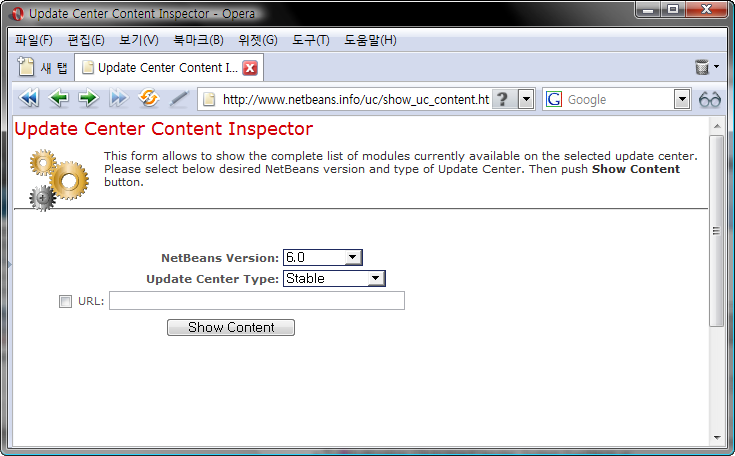
http://www.netbeans.info/uc/show_uc_content.html

위 URL을 방문하면 아래와 같은 플러그인 인스펙터 화면을 볼 수 있다.

사용자 삽입 이미지
사용자 삽입 이미지

여기서 사용하고 있는 넷빈즈 버전과 타입을 고르면 해당 카테고리의 플러그인 목록이 뜨고 이를 다운로드하여 설치하면 된다.
2007/11/12 12:50 2007/11/12 12:50
Trackback Address:이 글에는 트랙백을 보낼 수 없습니다

예식 사진은 부담스럽다.

2007/11/09 15:55

서비 Photo , ,


사진을 취미로 하는 사람이라면 누구나 한두 번은 예식 스냅촬영을 해 본 경험이 있으리라..
하지만 결과물은 어떤가? 처참한 결과물을 눈앞에 두고 실망 해 본 적은 없는가?
예식장이란 곳은 사진을 촬영하기에 열악한 장소라는 건 식장에서 사진을 담아본 사람이라면 공감할 것이다.

나 역시 예외는 아니어서 시작은 '예식장' 이란 장소에서 사진을 찍으면 그 결과물이 어떻게 나오는지
궁금함과 기쁜 날을 맞은 사람에게 작은 추억거리를 전해주고 싶다는 마음이었다.

건네주기 부끄러운 사진을 손에 들고 좌절하기도 했지만 이젠 차마 눈뜨고 못 볼 것 같은 사진에서는 벗어난
덕분인지 가끔 스냅촬영을 부탁받기도 한다.


이젠 이런 식장 사진 촬영에 익숙해질 만도 한데 스냅 사진 부탁을 받으면 기쁜 한편으로 잘 찍어주고
싶다는 기분의 크기만 한 걱정이 앞서는 건 여전하다.

예식 사진은 부담스럽다. 하지만, 여전히 예식 사진을 담는 건, 셔터를 누르는 즐거움보다, 식장에서
스포트라이트를 받고 있는 상대의 마음을 카메라에, 필름에 더 잘 담아내기를 원해서 겠지..


과장님, 예쁜 아기 보시고 행복하게 사세요.
사용자 삽입 이미지
2007/11/09 15:55 2007/11/09 15:55
Trackback Address:이 글에는 트랙백을 보낼 수 없습니다
  1. Blog Icon
    데이라잍

    완전 공감가는 글 입니다. ㅎㅎㅎㅎ
    하지만 우리 출중하신 회장님께서 이런 생각을 다 하신다니
    의외이긴 합니다...

  2. 사모님과 아기 모두 건강 하시죠?
    언제 아기 볼 수 있으면 좋겠어요.

  3. 서비님도 어서어서;;

  4. 그러게나 말이예요..
    요즘 열심히 '사람 사귀기'에 공을들이고 있지만.. 생각만큼 잘 안되네요..
    있을 때 잘 해야한다는 보편적 진실을 몸소 깨닫고 있습니다.

Java SE 6.0 Performance White Paper

2007/11/05 14:04

서비 JAVA ,

SDN( Sun Developer Network ) 에 JAVA SE 6.0 성능 백서가 발표되었습니다.

성능 개선과 추가된 기능들, 새로운 플랫폼 지원, 개발 진행 방향이라는 세 가지 꼭지로 정리된 이 백서에는 지금까지 JDK가 그래 왔던 것처럼 성능향상을 위해 컴파일러, 버추얼머신, 가비지콜렉션, I/O, 자료구조와 알고리즘 개선 부분을 성능 향상의 포인트로 두고 있습니다.

특히  JAVA 6.0 SE에서는, Boot Class 로딩 속도의 향상이라든지, SWING GUI 어플리케이션에 Double Buffering이 기본 지원사양으로 포함되었다든지, 버추얼 머신이 시작되기 전 Splash Screen을 처리할 수 있는 기능 등이 포함되는 등 JAVA 데스크탑 어플리케이션을 위한 성능 향상부분에 많은 노력을 기울이고 있다는 것을 알 수 있는데요.

JAVA 데스크톱 어플리케이션이 특정분야에 한정되어있고, GUI 디자인도 서서히 MARK-UP 형식의 언어로 넘어가는 현실에서 Swing, AWT와같은 Form-Based GUI 디자인이 언제까지 계속될진 모르겠지만 Swing 데스크탑 어플리케이션 개발을 위한 지원이 계속되고 있다는 것은 반길만한 일이 아닌가 합니다.

백서의 전문은
http://java.sun.com/performance/reference/whitepapers/6_performance.html
에서 확인하실 수 있습니다.
2007/11/05 14:04 2007/11/05 14:04
Trackback Address:이 글에는 트랙백을 보낼 수 없습니다